Open source · 2024 — present
Foundry Nuke Nodes for ComfyUI
ComfyUI is, in practice, the interface most VFX-adjacent generative work passes through. Its weakness is also structural: it was built for AI practitioners, not for compositors. Default nodes assume 8-bit sRGB. Merge math is simplified. Color management is essentially absent. Read and write nodes lose bit depth. A compositor opening ComfyUI for the first time finds a graph editor that looks familiar — the visual idiom is borrowed from Nuke — but operates by different rules in every meaningful detail. This package closes that gap. It is a set of ComfyUI custom nodes that replicate the behavior of common Foundry Nuke nodes, with professional OCIO color management as the foundation rather than an afterthought.
01 — The problem
A compositor's day-to-day in Nuke is built on a small number of high-trust operations. Read a 16-bit linear EXR. Merge over a background using Porter-Duff. Transform with a cubic filter. Grade with lift, gamma, gain. Apply an OCIO transform from the working space to display. Write back out at the correct bit depth and compression.
ComfyUI's default node set covers approximately none of this with the same fidelity. Reads are typically routed through PIL or OpenCV, neither of which handles EXR's full feature surface — multi-channel, multi-part, half-float — with the precision a comp expects. Merge nodes default to alpha-blending with simplified math. Transform nodes hardcode bilinear filtering. Color management is sRGB-or-nothing. LUT support, where it exists, doesn't survive HDR values above 1.0.
The compounding effect of all of this is that a compositor can't take output from ComfyUI and drop it into a Nuke script with confidence that the colorimetry, alpha, and bit depth will round-trip correctly. They have to either re-engineer their workflow around ComfyUI's assumptions, or stop using AI at the comp stage altogether. The first option is unrealistic for anyone in a production pipeline. The second is what most shops have, in fact, ended up doing.
The package documented here takes the other path — it changes ComfyUI's tools to match the compositor's expectations, rather than asking the compositor to change.
A compositor's tools don't fail loudly. They fail by drifting half a pixel, clipping a highlight, applying a transform with the wrong filter taps. The work is making sure none of that happens silently.
02 — Design principle: parity, not approximation
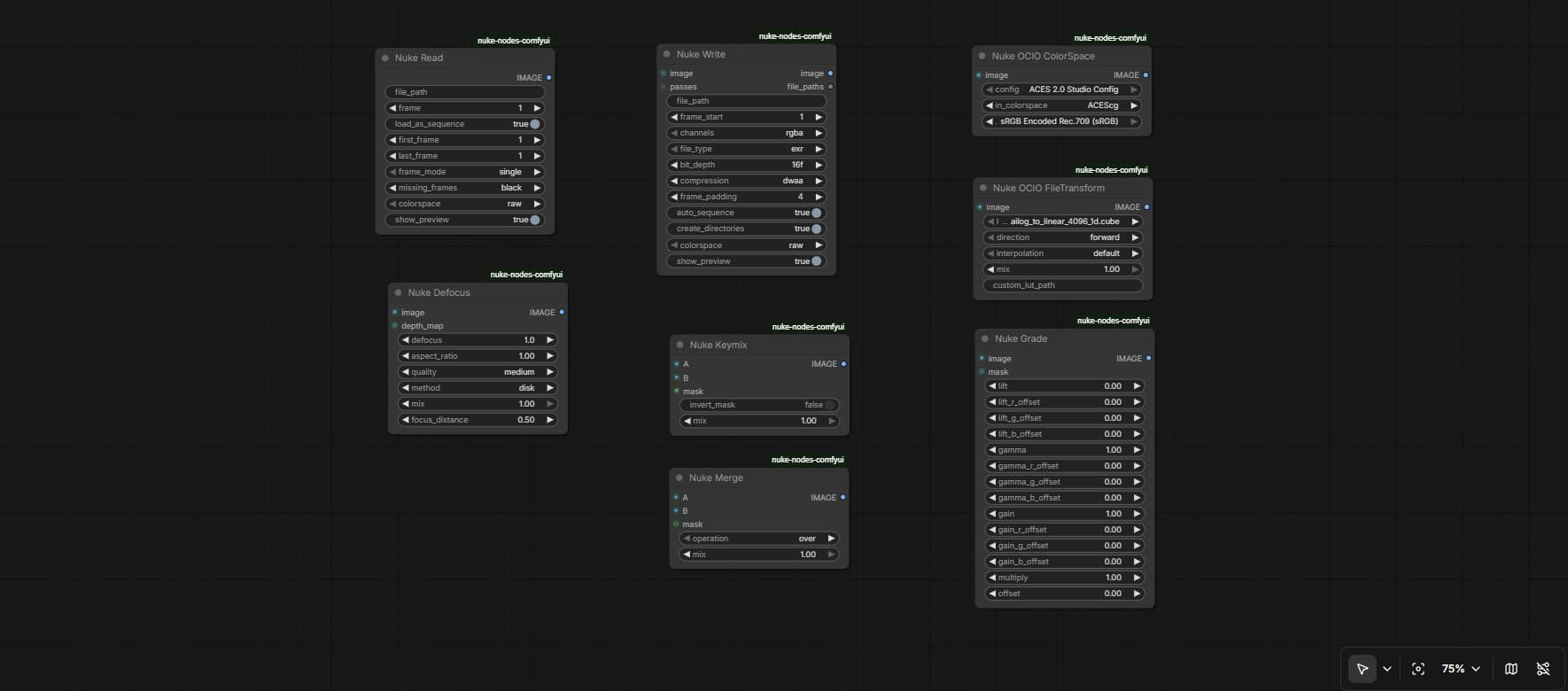
Every node in the package is named the way Nuke names it — NukeRead, NukeWrite, NukeMerge, NukeTransform, NukeGrade, NukeBlur, NukeVectorfield. Every node's controls match its Nuke counterpart. The Transform node exposes the same filter algorithms a compositor expects to find: impulse, cubic, keys, simon, rifman, mitchell, parzen, notch, and the lanczos and sinc variants. The Merge node implements the full set of Porter-Duff operations — over, under, in, out, atop, xor — alongside the standard blend modes (multiply, screen, overlay, soft light, hard light, color dodge, color burn, difference, exclusion, hypot, and the rest). The Read and Write nodes route through OpenImageIO, with proper sequence patterns (%04d, ####), missing-frame strategies (error, black, hold, nearest), and bit-depth controls all the way down to 32-bit float.
The point is not to build approximations. The point is muscle memory. A compositor should not have to relearn anything to use these nodes. They should look familiar in the graph, expose the parameters the compositor expects, and produce output that round-trips through Nuke without surprises.
03 — Color management as foundation
The single largest gap between ComfyUI's defaults and a real compositing pipeline is color management. The package addresses this with three OCIO nodes — NukeOCIOColorSpace, NukeOCIODisplay, NukeOCIOInfo — built on OpenColorIO 2.5 and the ACES 2.0 Studio Config baked in.
The decision to hardcode the config rather than load it dynamically deserves its own explanation, because it looks at first like the wrong call. ComfyUI's architecture does not support populating dropdown menus from a runtime configuration. If color spaces are loaded from a user-supplied OCIO config file, the dropdowns either appear empty until the user solves a setup problem, or get out of sync with the loaded config in ways that fail silently. Either failure mode is unacceptable in a tool a compositor is going to put in front of paying work. So instead, all 55 color spaces from ACES 2.0 Studio are hardcoded into the node definitions. Install the package, restart ComfyUI, and the full ACES color pipeline is there. No external files. No path configuration. No "why is the dropdown empty" issues on a Friday afternoon.
The cost of this decision is that the package is locked to one OCIO config. The benefit is that the config is the right one — the most current ACES standard, with comprehensive camera IDTs from every major manufacturer:
- ARRI: LogC3 (EI800), LogC4, with linear ARRI Wide Gamut 3 and 4 working spaces.
- Sony: S-Log3 with S-Gamut3, S-Gamut3.Cine, and the Venice variants of both.
- RED: Log3G10 in REDWideGamutRGB, plus the linear working space.
- Canon: CanonLog2 and CanonLog3 with Cinema Gamut D55.
- Panasonic: V-Log V-Gamut.
- Blackmagic: BMDFilm WideGamut Gen5, DaVinci Intermediate WideGamut.
- Apple: Apple Log.
- DJI: D-Log D-Gamut.
A compositor working on any modern shoot can plug their camera-original footage into a ComfyUI graph and have it color-managed correctly from the first frame. The display transforms — sRGB Display, Rec.1886 Rec.709 Display, P3-D65 Display, Rec.2100-PQ for HDR — match what Nuke's viewer process produces, so what the artist sees on screen is what the rest of the pipeline will see.
This is the foundation everything else in the package sits on. The merge nodes, the grades, the transforms — all of them assume that their inputs are linearly-encoded scene-referred data, because the OCIO infrastructure makes that assumption safe.
04 — LUT support, with HDR
The Vectorfield nodes — named after Nuke's Vectorfield, which is its LUT-application node — handle 1D and 3D LUTs in the standard formats compositors and colorists actually exchange: .cube, .3dl, .spi1d, .spi3d, .lut. Trilinear interpolation for 3D lookups. Linear interpolation for 1D. LUT caching so repeated application across a sequence is fast.
The detail that matters most here, and that almost every other LUT implementation in the AI-tooling ecosystem gets wrong, is HDR compatibility. Most LUT applicators clamp their input to 0–1 before lookup, which means a scene-referred linear value of 47 — a perfectly normal value for a sun in an HDR plate — becomes 1.0 before the LUT ever sees it. The Vectorfield nodes carry HDR values through the lookup, extrapolating beyond the LUT's defined domain rather than clamping. This is the only behavior that lets a compositor apply a creative LUT to HDR-generated content without losing the highlights they generated the content for in the first place. This was the bug that prompted the Vectorfield work in the first place — applying a show LUT to a 16-bit linear EXR generated by the HDR diffusion model and watching every highlight collapse to grey. The fix was a single afternoon of work; recognizing that it was the right thing to fix took longer.
The intensity control on the Vectorfield node ranges from 0 to 2.0 — below 1.0 it interpolates between the original image and the full LUT effect, above 1.0 it extrapolates the LUT's effect, which is occasionally useful for pushing a creative grade further than its author intended.
05 — What's in the package
Eight node families, organized to match the categories a compositor already thinks in:
- IO —
NukeRead,NukeWrite,NukeReadInfo. Routed through OpenImageIO with fallback to OpenCV and PIL. Full sequence support, missing-frame handling, EXR compression options (none, rle, zip, zips, piz, pxr24, b44, b44a, dwaa, dwab), bit depths from 8-bit through 32-bit float, automatic directory creation, optional auto-incrementing filenames for non-overwrite saves. - Merge —
NukeMerge,NukeMix. Full Porter-Duff and blend-mode operation set, mix factor, optional mask input, matte operations. - Color (OCIO) —
NukeOCIOColorSpace,NukeOCIODisplay,NukeOCIOInfo. ACES 2.0 Studio Config hardcoded. 55 color spaces. Display and view transforms matching Nuke's viewer process. - LUT —
NukeVectorfield,NukeVectorfieldInfo. 1D and 3D LUTs, multiple formats, HDR-compatible, intensity range 0–2.0. - Grade —
NukeGrade(lift/gamma/gain),NukeColorCorrect(HSV-based),NukeLevels(input/output levels). - Transform —
NukeTransform(translate, rotate, scale, skew, with eleven filter algorithms),NukeCornerPin,NukeCrop. - Blur —
NukeBlur(Gaussian, separate X/Y),NukeMotionBlur,NukeDefocus. - Viewer / Generate —
NukeViewer(channel shortcuts, gamma/gain),NukeChannelShuffle,NukeConstant,NukeRamp,NukeColorBars.
All nodes appear in the ComfyUI menu under a single Nuke category, so a compositor can find them without reading documentation.
06 — Reflection
The package has a small but real set of users — including, based on issue traffic, a handful of working compositors at studios that I won't name without permission. That adoption is the strongest validation the work has so far. A LUT applicator that handles HDR correctly and an OCIO bridge that doesn't require a config-file scavenger hunt are, it turns out, what people want when they actually try to use ComfyUI in a pipeline.
What is still missing is a real conversation. There is no support yet for deep compositing channels, for 3D nodes, or for the more specialized Nuke nodes that sit closer to the edge of compositor practice — Roto, RotoPaint, ScanlineRender, the particle system. Some of these are out of scope by intent; ComfyUI is not going to become a 3D system, and that is fine. Others are open questions. The Roto-style alpha tooling, in particular, is something I expect to revisit, since it is the gap most compositors raise first.
The architectural tradeoff at the heart of the OCIO integration — hardcoded config versus dynamic loading — has held up well in practice but it is a tradeoff. If the ACES standard updates substantively, the package needs to ship a corresponding update; the user cannot fix it themselves by editing a config. I think this is the right tradeoff for the audience, but it is the kind of decision that should be revisited every couple of years.
The broader pattern here is the same one that drives the HDR generation work: bridging a professional tool and an AI tool requires deep understanding of both, and the meaningful design decisions tend to come from the side that has a longer history with the problem. ComfyUI's defaults are not wrong for ComfyUI's original audience. They are wrong for compositors. Building the right defaults for compositors requires being a compositor first.
Next case study
Bit-depth Expansion U-Net
A 28M-parameter network trained from scratch to expand 8-bit imagery to true 16-bit float for VFX use.